
How Alfrada OS Works
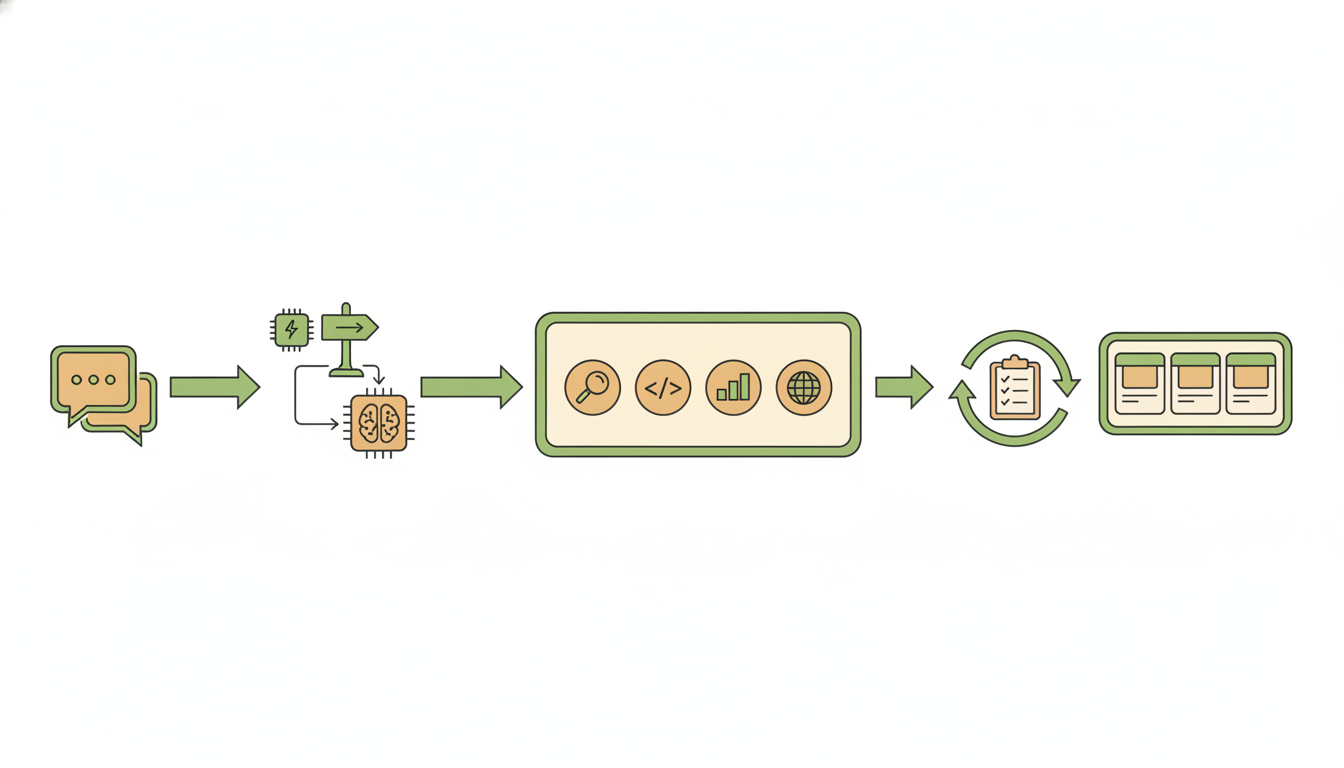
You describe a finished piece of work — a report, a deck, a cleaned dataset, an edited video. Alfrada OS plans it, runs the tools, and hands you the files. This page shows what happens in between.
The Operating Model
- Initiate — You open a session with a clear directive, or ask Alfrada OS whether it can help achieve a specific objective.
- Route — Alfrada OS reads the request and decides which model handles it, how hard to work on it, and where it runs. Your Effort setting controls how much self-review the turn gets, and on Auto it also steers which model tier is picked for each turn. If the chosen model's Zero-Data-Retention route is unavailable at that moment, Alfrada OS doesn't fail the turn — it switches to the next-best first-party model and shows you a short notice naming the model that took over. Momentary provider hiccups are retried the same way whether the turn runs as a single agent or a Swarm.
- Execute — It can use tools, integrations, code execution, browser workflows, memory, history search, and playbooks to move the work forward.
- Self-check — For substantial deliverables, Alfrada OS writes itself a checklist for the task (a rubric — its own marking scheme), grades its draft against it, and revises. On Medium effort that is one review-and-revise pass; on Beast it keeps revising until the draft passes (with a hard cap), and it also looks over any charts or images it produced for problems like unreadable labels or cut-off text. On Medium and Beast this isn't hidden: a live grading card appears right in the chat stream while Alfrada OS checks its own work.
- Deliver — Finished assets are captured in the Work Panel so outputs stay attached to the job.
- Retain — Useful memory, workflow patterns, and playbooks make future sessions stronger.
Under the hood
- If OpenRouter has no Zero-Data-Retention endpoint that supports tools, the turn falls to the first available first-party provider in this order: OpenAI → Anthropic → Bedrock → Google → Dashscope → Z.ai.
- Transient provider faults are classified the same way for the single agent and Swarm workers, so both retry identically.
- The self-check loop: Medium runs with a revision budget of one pass; Beast raises the cap and adds a visual grading pass over produced charts and images. The in-chat indicator is the
rubric_gradingstream event. - The Swarm consent preference is the Safety
mode_switchsetting (ask/always_allow/never). The switch itself is thechoose_modetool — consent is enforced by an interrupt plus the banner, not by prompt instructions, so the agent cannot switch modes silently. - The five memory tools behind Agent Intuition:
memory_search,memory_create,memory_update,memory_delete,playbook.
Beyond Chat: The Workspace Advantage
Alfrada OS is not a standard chatbot. It is a stateful execution engine designed for complex deliverables and multi-step work.
- Stateful Sessions — Accumulate files, live data, outputs, and revisions in a persistent workspace.
- Durable Memory — Agent Intuition learns how you like work done through five focused memory tools, and it keeps its receipts: when a fact changes, the old version is superseded, not erased, so every memory carries its own version history. See Memory.
- Searchable History — Alfrada OS can search older conversations and files when a project needs continuity.
- Scalable Execution — Most work runs as one focused agent, which can still hand pieces to parallel helpers mid-turn. When a job would genuinely benefit from a full team, Alfrada OS may offer to escalate the turn to Swarm — and a Swarm planner may offer to drop a small follow-up back to the single agent. Either way, a consent banner pauses the turn and nothing switches until you click Switch to Swarm or Stay on Agent (or the reverse). Your standing preference lives at Settings → Agent Behavior → Safety → Switching to Swarm mode:
Ask(the default),Always allow, orNever. - Secure Integrations — Work inside your connected accounts, including Google Workspace (Calendar, Gmail, Drive, Docs, Sheets, Slides), Outlook, Microsoft Teams, OneDrive, GitHub, Slack, Discord, Zoom, LinkedIn, Facebook, Twitter/X, Canva, Google Analytics (GA4), and Hunter — plus WhatsApp, which is built into Alfrada OS itself. See Integrations.
- Autonomous Scheduling — Set recurring tasks so a workflow runs again later and returns a finished artifact, not just a reminder.
A Practical Mental Model
You steer in chat. The work happens in tools. Everything the work produces lives in the session, ready for the next time you pick the project back up.
Step Inside a Session
Watch how a request moves from raw prompt to polished output.
Rules of Engagement
Get the highest possible yield from your sessions by following these five core principles.
Provide constraints, not magic
Give the system explicit parameters, context, and boundaries to operate within. The more specific the frame, the better the output.
Analyze [subject] using only [these 3 sources]. Focus on risks and opportunities for [audience]. Cap the output at 500 words and flag any claims you cannot verify.Explicit constraints eliminate guesswork and produce focused, decision-ready output.
Name your deliverables
Always specify the exact output format you need. Say Markdown memo, structured CSV, or 10-slide presentation — never just "help me with this."
Turn this research into a 10-slide investor update deck. Each slide should have a headline, 3 bullet points max, and a source footnote. Export as a presentation file.Naming the format forces the system to plan around a concrete artifact instead of producing freeform text.
Ask for continuity explicitly
When the job started earlier, tell Alfrada OS to search history and pull the relevant context forward. Do not assume it will remember on its own.
Search my conversation history for the last time we worked on [project]. Summarize where we left off, what files matter, and what the best next step is.Explicit continuity requests activate history search and bring forward the right context.
Separate chat from artifacts
Keep the chat channel strictly for steering and revision. Let the Work Panel handle the finished assets. This keeps the thread readable and the outputs findable.
Codify your success
When you nail a complex workflow, save it as a Playbook so you never have to design it from scratch again. A playbook turns a one-off win into a repeatable operating pattern.